Costing

Costing: snap a photo instead of typing.

Upload the floor plan and the scope of work. Mendato creates the customer, the site and all rooms, reads the frequencies from the scope of work and calculates the person-hours per month. With AI. You review instead of typing. And if you prefer to enter everything yourself: Mendato offers classic costing as well.

1 · Room book from the floor plan
2 · Tasks from the scope of work
3 · Person-hours per month
Animation: Handskizze und Leistungsverzeichnis werden zur fertigen Kalkulation
✓
Rooms from the floor plan, even from a hand sketch
✓
Tasks from the scope of work
✓
Person-hours per month calculated automatically
Sound Familiar?

After the site visit, the real work begins.

Rooms, areas, floor coverings, the scope of work: everything has to be typed by hand into a costing tool or an Excel sheet. It takes time, and things go wrong.
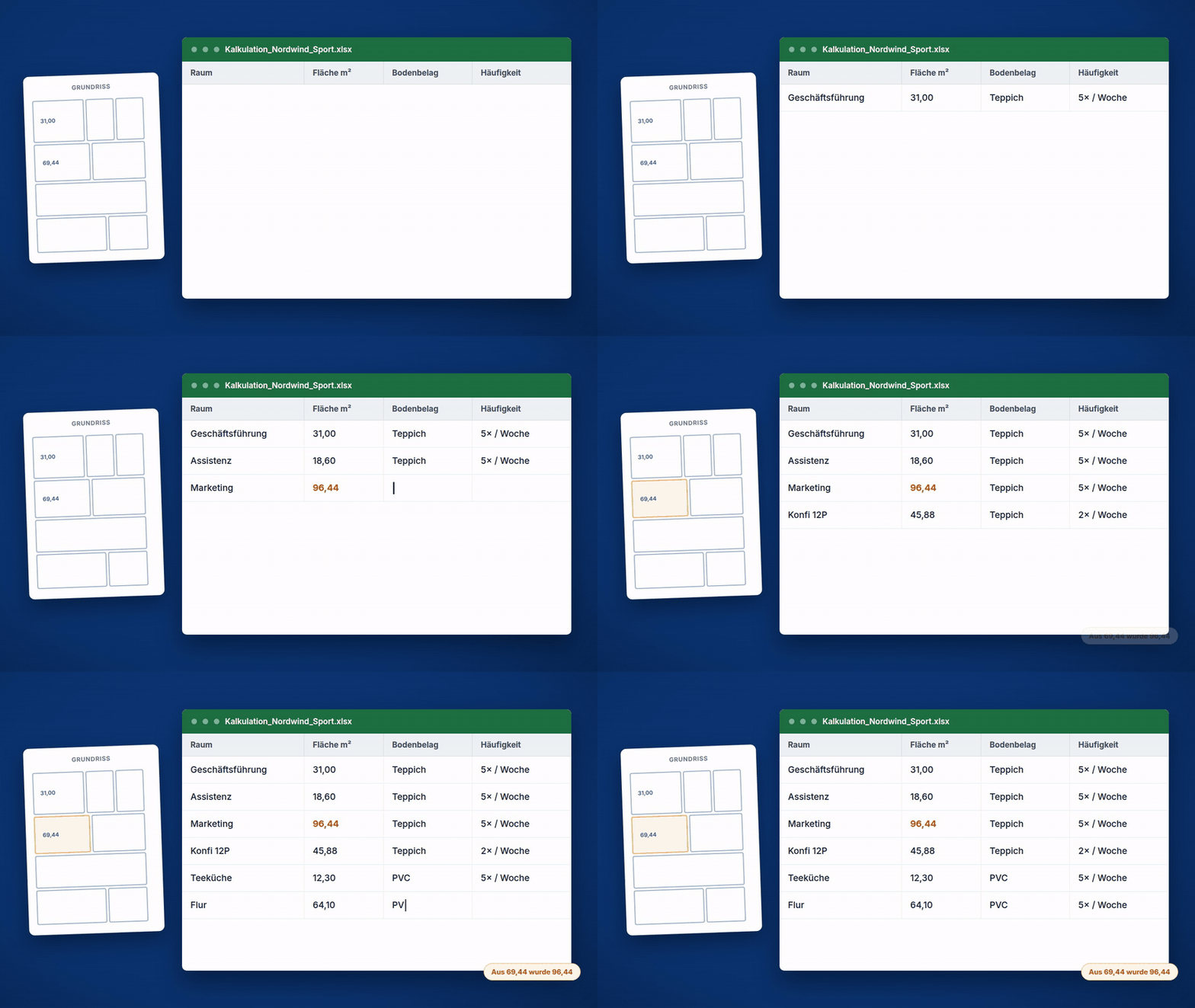
Animation: Grundriss wird Raum für Raum von Hand in eine Excel-Tabelle übertragen
⌨️

Typing it in room by room

42 rooms, every area, every floor covering typed by hand into the system or the spreadsheet. That costs evenings. Yours, your estimator’s or your sales rep’s.

🔍

Errors stay hidden

A transposed digit in one area only shows up when the costing doesn’t add up at the end. Then the search begins.

📄

The scope of work stays on paper

Which task runs how often in which room? Whoever transfers that from the scope of work does a second round before they can even start calculating.

The Solution

Snap. Upload. Costing done.

With Mendato, you simply take a photo of the floor plan and the scope of work. The AI does the rest: creating rooms, assigning tasks, calculating person-hours. Philipp Geimer, founder of Mendato, shows exactly how it works in this video (in German).

The Core

Step by step: from floor plan to target vs. actual comparison.

Six steps, one set of data: room book, performance values, frequencies, person-hours, quote, planning.

Step 1

The digital room book

Every room with its size and floor covering. You create the room book manually or simply take a photo of the floor plan: a clean architect’s plan or a sketch, both work.

  • ✓
    Photograph the floor plan: Mendato detects the rooms and creates them at the site. Architect’s plan or sketch, both work.
  • ✓
    Sizes and floor areas: every room is listed in the room book with its area and floor covering.
  • ✓
    Manual too: you can create or update any room yourself.
Typical for: site visits, quotes, site launches: wherever things are typed in by hand today.
Try Costing for Free →
1
→RaumbuchGeschäftsführung31,00 m² · Teppich · 3. OGAssistenz18,60 m² · Teppich · 3. OGKonfi 12P45,88 m² · Teppich · 3. OG✓ 42 / 42 Räume angelegt
2
Leistungswerte · Stammdatenvordefiniert je Objekttyp · anpassbar pro Objekt und AuftragBüroraum220 m²/h✎Sanitär65 m²/h✎Flur / Verkehrsflächedein Wert gilt400 m²/h✎…
Step 2

The performance values

Mendato comes with predefined performance values for each type of site. You don’t start from scratch. And you can adjust every value per site and per order.

  • ✓
    Predefined per site type: suitable performance values are stored in Mendato. You don’t start from scratch.
  • ✓
    Adjustable per site: your company works differently? Then your value applies.
  • ✓
    Customizable per order: special cases get their own values without changing the master data.
Typical for: estimators with their own benchmark values: store them once instead of typing them in every time.
Try Costing for Free →
Step 3

The frequencies

How often is which room cleaned? You enter it manually, or the AI pulls it straight from the scope of work: it recognizes the tasks and assigns the cleaning intervals to the rooms.

  • ✓
    Read from the scope of work: the AI recognizes which service runs how often in which room.
  • ✓
    Manual entry possible: no scope of work at hand? Frequencies can be entered directly.
  • ✓
    Visible on the room: every interval sits on the right room, easy to check and correct.
3
Häufigkeiten je Raumaus dem Leistungsverzeichnis erkannt · manuell änderbarGeschäftsführung5× / WocheKonfi 12P2× / WocheSchulungsraum1× / Woche…
4
Kalkulation · Nordwind Sport GmbH42 Räume · 33 Aufgaben · Leistungswerte berücksichtigt113,4Std.kalkulierte Personenstunden pro Monatjeder Wert sichtbar & korrigierbar
Step 4

The calculated person-hours

From all rooms, all tasks and your performance values, Mendato calculates the person-hours per month. Everything is taken into account, every value stays visible.

  • ✓
    Everything counts: areas, frequencies, performance values, in one calculation.
  • ✓
    Traceable: you see per room what drives the hours.
  • ✓
    Optimizable: change a value, the result adjusts.
Step 5

The quote

Based on the calculated person-hours and your prices, you create the quote. The numbers come from the costing, not from gut feeling.

  • ✓
    Price times hours: the quote builds directly on the costing.
  • ✓
    Solid in front of the customer: you can explain where every number comes from.
  • ✓
    Quotes in Mendato: costing and quote stay in one system.
5
Angebot · UnterhaltsreinigungNordwind Sport GmbH · monatlichKalkulierte Personenstunden113,4 Std./MonatDein Stundenverrechnungssatzdein PreisAngebotssumme= Stunden × Satzerstellt in Mendato
6
Soll gegen Ist · pro ObjektNordwind Sport GmbH · MonatSoll · kalkulierte StundenIst · erfasste Stunden aus der Zeiterfassung✓ die Rechnung geht auf
Step 6

Planning and target vs. actual comparison

The shifts are created from the costing. And later, time tracking shows you whether the calculated hours match the hours actually worked.

  • ✓
    Shifts from the costing: planning doesn’t start from scratch.
  • ✓
    Actual hours from time tracking: hours worked are recorded automatically.
  • ✓
    Target vs. actual: per site, you see whether the numbers add up.
Try Costing for Free →
Hand Sketch

Your floor plan doesn’t have to be an architect’s plan.

An old plan from the landlord, a photo of the escape plan in the stairwell or a sketch on squared paper: Mendato reads what’s on it. You check the rooms and correct whatever doesn’t fit.

  • ✓
    A hand sketch is enough: eight rooms on paper, photographed, done.
  • ✓
    You stay in control: every room is visible in the room book before anything is calculated.
  • ✓
    Correct instead of starting over: a wrong value is one click, not another evening.
ArchitektenplanFoto vom PlanHandskizzeBüro · ca. 18 m²✓ Mendato liest alle drei
Why Mendato

Excel only calculates. Mendato knows your site.

Costing in Excel

  • ✕
    Every room is entered by hand: area, floor covering, frequency.
  • ✕
    Performance values live in another file or in someone’s head.
  • ✕
    One error in a single cell carries through the entire costing.
  • ✕
    The scope of work sits next to it, and the mapping is done twice.
  • ✕
    Nothing follows from the finished costing: planning starts from scratch.
  • ✓
    Rooms come from the floor plan, even from a hand sketch.
  • ✓
    Performance values are stored and adjustable to your company.
  • ✓
    Every value is visible and can be corrected individually.
  • ✓
    The scope of work is linked directly to the rooms, with a frequency per service.
  • ✓
    The costing generates shifts and the target vs. actual comparison.
Costing
→
Scope of Work
→
Shifts

Next up: the scope of work.

Costing is the beginning. The digital scope of work brings the tasks into everyday work: shifts per day, rooms and services right in your cleaners’ app.

Go to the Scope of Work Module →
FAQ

What cleaning companies often ask

What do I need for Mendato to create a costing?
A floor plan and, if available, the scope of work. The floor plan can be a PDF, a photo or a hand sketch. From it, Mendato creates the customer, the site and the room book.
Where do the performance values come from?
Mendato comes with performance values and uses them to calculate the person-hours per month. You can adapt every value to your company, permanently in the master data or individually in the costing.
What if the AI reads a room incorrectly?
Then you correct it. Every room, every area and every assignment is visible before anything is calculated. You review the result instead of typing everything in yourself.
What happens after the costing?
The costing directly generates the shifts with their tasks. Later, time tracking lets you compare the calculated hours with the actual hours, per site.
How much does costing cost?
Costing, room book and scope of work are included from the Mini package. The AI route via photo and upload is part of Pro Plus. Packages start at €99/month (plus VAT), with a 7-day free trial. You can find all packages in detail on our pricing page.
From the Field
Over 500 cleaning companies
already do their costing and planning with Mendato.

Shqipe Parduzi from CleanIT says: “Quotes, costing, time tracking: it’s a great tool all in one.” A costing that keeps working in the system instead of sitting in a folder.

See All Customer Stories →

Cost your next site without typing it in.

Photograph the floor plan, upload the scope of work, review the costing. Try costing free for 7 days.

Free · No Contract · Ends Automatically

Personalplanung

Personalplanung in der Reinigung – für jede Leistungsart die richtige.

Unterhaltsreinigung läuft wiederkehrend, Sonderreinigung jede Woche neu. Mendato plant beide so, wie sie wirklich funktionieren – und jede Änderung fließt direkt in den digitalen Stundenzettel.

1 · Unterhaltsreinigung 2 · Sonderreinigung 3 · Plan = Stundenzettel
↻ Unterhaltsreinigung wiederkehrend einmal anlegen – läuft automatisch Mo · Mi · Fr · feste Aufgaben ⚡ Sonderreinigung jede Woche neu dynamisch planen – wer passt, wer kann? Kapazität · Qualifikation Ein Dienstplan → direkt in den Stundenzettel
✓ Für jede Leistungsart die passende Planung ✓ Vertretung per Drag & Drop ✓ Plan fließt in den digitalen Stundenzettel
Kennst du das?

Planung in Excel klappt – bis
der Betrieb wächst.

Mit mehr Objekten und Mitarbeitern wird aus der Tabelle schnell ein Risiko.

🗂️

Kein Überblick

Niemand sieht auf einen Blick, wer wann in welchem Objekt ist. Das Wissen steckt in Köpfen und Tabellen-Tabs.

🤒

Ausfälle = Chaos

Krank oder Urlaub – und plötzlich bleiben Einsätze unbesetzt. Oft fällt es erst auf, wenn der Kunde anruft.

🔁

Eine Logik für alles

Wiederkehrende Unterhaltsreinigung und dynamische Sonderreinigung werden mit demselben starren Werkzeug geplant.

Der Kern

Zwei Leistungsarten,
zwei Planungen.

Reinigung ist nicht eine Planung. Mendato bildet beide Welten ab – statt eine Einheitslösung zu erzwingen.

Leistungsart 1

Unterhaltsreinigung

Planbar und immer gleich: feste Objekte, feste Zeiten, feste Aufgaben. Solche Schichten legst du einmal an – dann laufen sie automatisch wiederkehrend.

  • ✓Wiederkehrende Schichten einmal definieren – z. B. Mo/Mi/Fr, 14–18 Uhr, statt jede Woche neu eintragen.
  • ✓Leistungsverzeichnis hinterlegt – der Mitarbeiter sieht genau, was im Objekt zu tun ist.
  • ✓Qualität wird planbar – Aufgaben sind dokumentiert, nicht „im Kopf“.
Typisch für: Büros, Kliniken, Schulen – feste Objekte mit regelmäßigem Rhythmus.
Personalplanung kostenlos testen →
1
Klinikum Süd · Schicht ↻ wiederkehrend Zeit Mo · Mi · Fr 14:00–18:00 Aufgaben laut Leistungsverzeichnis Flure & Treppenhäuser wischen Sanitär desinfizieren Müll entsorgen · Eingangsbereich
2
Glasfassade Bürohaus · KW 22 Sonderreinigung · Termin mit Kunde abstimmen Passende Mitarbeiter: MK M. Kowalski Frei · Glasreinigung · Führerschein ✓ ✓ TB T. Berger Bereits verplant · kein Führerschein ✕ AY A. Yıldız Frei · Glasreinigung · Höhenschein ✓ ✓
Leistungsart 2

Sonderreinigung

Fenster-, Bau- und Grundreinigung: jede Woche anders. Hier planst du dynamisch – und findest in Sekunden die richtigen Mitarbeiter für den Einsatz.

  • ✓Wochenweise dynamisch planen – wo stehen Einsätze an, wer hat Kapazität?
  • ✓Nach Qualifikation filtern – wer kann die Leistung, wer hat den Führerschein?
  • ✓Richtige Mitarbeiter finden – statt in Listen zu suchen, schlägt Mendato die passenden vor.
Typisch für: Fenster-, Bau- & Grundreinigung – wechselnde Einsätze mit speziellen Anforderungen.
Personalplanung kostenlos testen →
Überblick

Der Dienstplan, der allen zeigt: wer ist wo.

Die zentrale Top-Übersicht für den Objektleiter: Wer ist wann in welchem Objekt? Der komplette Einsatzplan – über alle Objekte und Mitarbeiter hinweg, auf einen Blick. Keine Excel-Tabs, kein Suchen.

  • ✓Alle Objekte und Mitarbeiter in einer Ansicht.
  • ✓Sofort erkennbar, wo noch Lücken sind.
  • ✓Filtern nach Objekt, Mitarbeiter oder Zeitraum.
Dienstplan · KW 22 MoDiMiDoFr M. Kowalski T. Berger A. Yıldız S. Meyer L. Petrov
🤒 T. Berger krank gemeldet 2 Einsätze heute betroffen Bürohaus West · 14:00 offen – Vertretung? Drag SM S. Meyer frei · qualifiziert ✓ eingeplant Urlaubskonten S. Meyer 12 / 30 Tage A. Yıldız 25 / 30
Vertretung

Ein Ausfall, ein Drag & Drop.

Krank oder Urlaub? Mendato zeigt sofort, welche Einsätze betroffen sind. Du disponierst per Drag & Drop um – kein Objekt bleibt unbemerkt unbesetzt.

  • ✓Betroffene Einsätze sofort sichtbar – kein mühsames Durchsuchen.
  • ✓Umplanen per Drag & Drop – schnell und intuitiv.
  • ✓Urlaubskonten im Blick – wer hat wie viel Urlaub, wer ist wann verplant.
Das Beste daran

Jede Umplanung passt den Stundenzettel automatisch an.

Der Dienstplan ist keine isolierte Plantafel. Alles, was du planst oder verschiebst, fließt in Echtzeit in den digitalen Stundenzettel – egal ob Unterhalt oder Sonder. Niemand muss mehr nachdenken, wer für wen eingesprungen ist.

Dienstplan Vertretung eingetragen T. Berger · Bürohaus · 14:00–18:00 S. Meyer · Bürohaus · 14:00–18:00 ↻ Vertretung per Drag & Drop in Echtzeit Digitaler Stundenzettel S. Meyer14:00–18:004:00 M. Kowalski06:00–14:308:00 A. Yıldız07:30–12:004:30 ✓ automatisch aktualisiert · direkt Richtung Lohn
Warum Mendato

Excel kennt den Unterschied nicht.
Mendato schon.

Excel & Allround-Tools

  • ✕Kein Live-Überblick – wer wo ist, muss man zusammensuchen.
  • ✕Keine Vertretungslogik – bei jedem Ausfall Handarbeit.
  • ✕Kennen den Unterschied zwischen Unterhalts- und Sonderreinigung nicht.
  • ✕Kein Leistungsverzeichnis pro Objekt – Wissen bleibt im Kopf.
  • ✕Planung und Stundenzettel sind getrennt – doppelte Arbeit.

Mendato – für Gebäudereiniger gebaut

  • ✓Dienstplan über alle Objekte & Mitarbeiter auf einen Blick.
  • ✓Vertretung per Drag & Drop, Urlaubskonten inklusive.
  • ✓Zwei Planungsarten: Unterhaltsreinigung automatisiert, Sonderreinigung dynamisch.
  • ✓Leistungsverzeichnis pro Objekt hinterlegt.
  • ✓Jede Planung fließt direkt in den digitalen Stundenzettel.
Personalplanung → Zeiterfassung → Lohnabrechnung

Teil eines Ganzen.

Die Personalplanung ist nahtlos mit Zeiterfassung, Objektverwaltung und Lohn-Export verbunden. Geplant, erfasst, abgerechnet – ohne Medienbruch.

Das komplette Mendato-System ansehen →
Häufige Fragen

Was Gebäudereiniger oft fragen

Nein. Wiederkehrende Schichten der Unterhaltsreinigung legst du einmal an – mit Objekt, Zeiten und Aufgaben. Danach wiederholen sie sich automatisch. Nur die dynamische Sonderreinigung planst du wochenweise neu.
In Sekunden. Mendato zeigt dir sofort die betroffenen Einsätze und schlägt verfügbare, passende Mitarbeiter vor. Die Vertretung trägst du per Drag & Drop ein – der Stundenzettel passt sich automatisch an.
Ja. Das Leistungsverzeichnis ist pro Objekt hinterlegt. Der Mitarbeiter sieht zu seiner Schicht genau, welche Aufgaben anstehen – so wird Qualität planbar und unabhängig vom Wissen einzelner Personen.
Direkt. Jede Planung und jede Umplanung fließt in Echtzeit in den digitalen Stundenzettel. Geplant = erfasst – und von dort direkt weiter Richtung Lohnabrechnung, ohne doppelte Eingabe.
Die Personalplanung ist in allen Mendato-Paketen enthalten – ohne Aufpreis. Die Pakete starten bei 99 €/Monat (zzgl. MwSt.) und richten sich nach der Zahl deiner Reinigungskräfte. Keine Einrichtungsgebühr, keine versteckten Kosten, 7 Tage kostenlos testen. Alle Pakete im Detail findest du auf unserer Preise-Seite.
Aus der Praxis
Über 500 Gebäudereiniger
planen ihr Personal bereits mit Mendato.

Sie alle haben gemerkt: Eine Excel-Tabelle bildet nicht ab, wie Reinigung wirklich plant. Erst die Unterscheidung nach Leistungsart – plus Vertretung per Drag & Drop und der direkte Draht zum Stundenzettel – macht Planung verlässlich.

Alle Kundenstimmen ansehen →

Plane dein Personal so, wie deine Firma wirklich arbeitet.

Unterhaltsreinigung automatisiert, Sonderreinigung dynamisch – und alles fließt in den digitalen Stundenzettel. Teste die Personalplanung 7 Tage kostenlos.

Kostenlos · Keine Laufzeit · Endet automatisch